

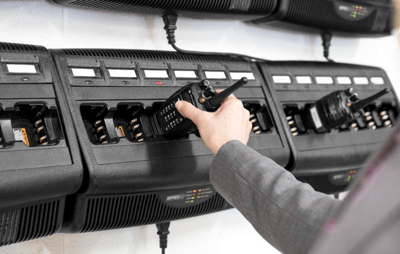
Reliable batteries keep your team talking. The fastest way to extend Motorola two-way radio battery life is to use Motorola-approved chargers, follow a steady daily charge routine, store spares correctly, and replace aging packs before capacity drops.
This guide provides clear steps to reduce downtime and help your batteries last longer, based on our extensive service experience.
Quick Answer: How To Make Radio Batteries Last Longer
Use these fast, proven habits to get more runtime from every battery.
-
Charge with Motorola-approved chargers and follow the indicator lights.
-
Top off during shifts only when needed. Avoid constant hot-cradle time.
-
Keep contacts clean and dry.
-
Store spares in a cool, dry place at about half charge if they will sit for a while.
-
Cycle test older packs and replace when capacity or runtime drops
Watch our short battery care overview:
How Long Does a Motorola Radio Battery Last?
Most teams see dependable day-long performance during the first 12 to 18 months of daily use. Actual life depends on duty cycle, temperature, and charging habits. If a full-shift battery no longer lasts until the end of the day, plan for a replacement.
New Battery Setup Tips
Give new Motorola two-way radio batteries a smooth start so they reach full capacity quickly.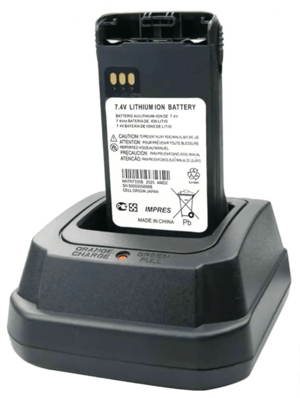
1. Charge Upon Receipt
If you receive new batteries that will be used soon, put them on a Motorola-approved charger within a month of delivery so they are ready for service.
2. Battery Initialization:
Before first use, place the battery in a Motorola-approved charger and allow it to charge fully. This helps the battery reach maximum capacity and consistent runtime during early cycles.
3. First-Week Use
Use the radio normally during the first week. Watch the runtime during early cycles and note any unusual heat or rapid drops.
Daily Charging and Care Best Practices
These daily habits protect capacity and reduce heat-related wear.
-
Use a Motorola-approved desktop or multi-unit charger that matches your battery chemistry.
-
Watch the charger indicator lights and let it finish a full cycle.
-
If you need opportunity charging, keep top-offs short and rotate radios so the same unit is not always in the cradle.
-
Keep chargers in a ventilated, room-temperature space. Heat is the enemy. Avoid windows, heater vents, hot equipment racks, and parked vehicles.
-
Check that radios are seated correctly. A loose connection can cause partial charges and excess heat.
-
Keep battery contacts clean with a dry microfiber cloth.
-
When the charger indicates full, return the radio to service or swap it for a spare, rather than leaving it sitting warm in the cradle.
- Keep batteries away from keys, coins, and other metal objects that can short the contacts.
Storing Your Spare Batteries Properly
When your radios aren’t in use, proper storage of their batteries can significantly extend their lifespan. If a battery will sit for more than a couple of weeks:
-
Store in a cool, dry, and well-ventilated area at a temperature of 65 to 85°F and a relative humidity of 30 to 60 percent. Think room temperature, not a hot attic or cold closet.
-
Store around 40 to 60 percent charge, and top up every six to nine months during storage.
-
Do not store batteries while connected to the radio, and do not store them on a charger.
Battery Do and Do Not Checklist
Use this quick checklist to reinforce safe daily habits.
Do:
-
Keep battery contacts clean with a dry cloth.
-
Inspect cases for cracks, swelling, or damage.
-
Train staff to power off and dock radios the same way every shift.
-
Recycle spent batteries through approved channels.
Do Not:
-
Mix non-approved batteries or chargers.
-
Leave batteries in hot cars or direct sunlight.
-
Ignore swelling, unusual odor, or rapid heating. Remove from service and recycle.
Signs It Is Time To Replace a Battery
These are the clearest indicators that a pack has reached the end of its life.
-
It cannot make it through a normal shift.
-
Charge time is very short or very long compared to new.
-
The radio resets or drops audio during transmit.
-
Visible swelling, a cracked case, corroded contacts, or the pack will not seat.
Why Motorola-Approved Batteries and Chargers Matter
Genuine Motorola batteries and approved chargers come with the necessary protection circuitry and charging profiles specifically designed for your radio model. They help prevent over-temperature conditions, extend usable life, and support warranty and safety compliance. Using non-approved chargers or batteries with two-way radios can damage the pack or the radio, potentially voiding warranty and compromising safety compliance.
Need Help Choosing the Right Batteries or Chargers?
We're here to help. Chicago Communications can evaluate your fleet, recommend the best charging setup for your environment, and source genuine Motorola batteries and multi-unit chargers.
Whether you need new batteries, repairs, or expert advice, we’re always just a phone call or email away.

Frequently Asked Questions
What Is the Best Way To Store a Radio Battery?
Store in a cool, dry place at about half charge. Label the date and cycle monthly with a short top-off. Do not store on a charger.
How Long Should I Charge a Motorola Radio Battery?
Use a Motorola-approved charger and allow it to complete the charging process. Charge times vary by capacity and chemistry. If you need opportunity charging, rotate radios so the same battery is not constantly in a warm cradle.
When Should I Replace a Two-Way Radio Battery?
Replace when it will not last a standard shift, shows swelling or damage, or causes resets during transmission. If the runtime continues to shrink after normal use and charging, it is time to replace.